Same-Day Free Estimates with 30-Minute Arrival Windows for Collin and Dallas County areas Since 1977.

October 18, 2017

How to Program Your Remote or Keypad in Plano, TX

Have you recently purchased a new opener or a remote for an existing opener? Programming your remote or keypad to your opener is simpler than you may think. Not all openers, remotes, and keypads are alike but in a few easy steps you should be well on your way to effortlessly opening your garage door.

Determine what opener you have

The first step in programming your remote or keypad is to determine the type of garage door opener that you have. It is important to ensure that the remote or keypad that you purchased is compatible with your opener. Be sure to get as much information about your opener as possible, such as the make and model number, before you make your purchase. What about a universal remote? As wonderful as universal remotes may be, they are not 100% “universal”. Be sure to double check that your opener is compatible with the specific universal remote that you choose, especially if you have an older system.

Locate the learn button

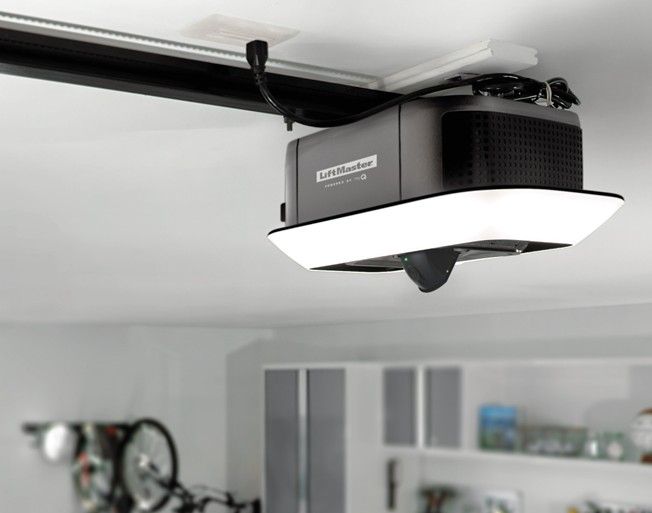
All garage door openers have a learn button used to program your remotes/keypad. The learn button will be a small button located on the opener itself; however, color, shape and location depend on the make and model of your opener. Be sure to check under the light cover, on the back, bottom, and sides of your opener. In most newer models, you can locate the learn button by following a small wire hanging from the back. Once you have located it you will be ready to program and/or purchase your remote.

Program your remote

The process to program your remote varies depending on the type of opener, but most use a similar process. Always check the instructions provided with your specific remote as some steps may vary slightly.
Generally, to program your remote, press and release the learn button on your opener which should cause the indicator light to blink. Once that light is blinking your opener is in “learn mode”. This will allow you to program your remote by pressing and releasing the button you will use to open your garage. Be sure to test that your remote is working properly by pressing the remote again to see if the door opens.
*Note: Pressing the learn button until the indicator light stops blinking will erase any remotes currently programmed to your system.

Program your keypad

Programming your keypad will be a familiar process if you have ever programmed a remote. Similarly to your remote, press and release the learn button until the indicator light blinks. Once your opener is in “learn mode” you will be able to type in the desired code on your keypad. Some keypads require you to press the asterisk (*) or pound (#) symbol after your desired code or to enter the code a second time. As always, check the instructions provided with your keypad. Enjoy the easy access to your garage!   By  Nick McGregor , General Manager of  Plano Overhead Garage Door
Tags:  Coding Garage Door Opener Garage Door Keypad Garage Door Remote How to Code a Keyless Entry How to Code a Remote Programming Garage Programming Garage Door Opener

Share this article

Recent Posts

Garage Door company serving Dallas, TX.
May 5, 2026
Cut energy bills with insulated, energy efficient garage doors in Dallas TX. Plano Overhead helps you choose the right R-value & style for your home. Free estimates — call 972-422-1695 today!
New garage door installation company installs charcoal steel sectional garage door with stone accent
May 5, 2026
Discover why Dallas TX homeowners choose custom garage door installation for better curb appeal, value & security. Plano Overhead's experts guide you through every option. Call 972-422-1695!
A two-story suburban house with beige siding, a large white garage door, and green landscaping in the front.
February 23, 2026
Learn how to spot common residential garage door repair needs in Dallas TX — broken springs, off-track doors, opener issues & more. Expert guidance from Plano Overhead. Call 972-422-1695 today!